![logo-white.png]](https://knowledge.benq.com/hs-fs/hubfs/logo-white.png?width=50&height=50&name=logo-white.png)
Latest Device Versions:
Windows Version 1.14.11.0
Mac Version 1.14.11.0
iOS Version 1.14.11.0
Web Version 2.0.14.3
[New Features]
Shape recognition for straight lines
EZWrite 6 can now automatically convert a hand-drawn line into a straight line object. While drawing a straight line, hold your finger on the screen for 1.5 seconds to convert it (DON'T RELEASE AFTER DRAWING UNTIL IT CONVERTS) .
(Video taken from EZWrite6 Android, but function is similar).
H5P file support
Users can now import and open offline H5P content in EZWrite 6. H5P content is available in offline mode only. Playback compatibility may vary depending on the H5P content type and libraries used in the file. Some H5P content may not display or function correctly on Android. To import H5P files on Android, update AMS Files to version 3.0.13.0 or later.
For more information about H5P, visit the H5P website.
https://h5p.org/
(Video taken from EZWrite6 Android, but function is similar).
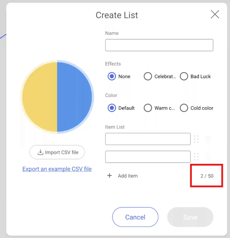
Spinner enhancements
-
The Spinner tool now supports up to 50 items.
-
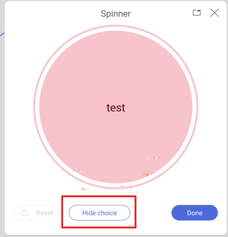
Users can also hide a selected item so that it will not be selected again in subsequent rounds.
2D object angle
EZWrite 6 can now display the angles of supported 2D polygon objects.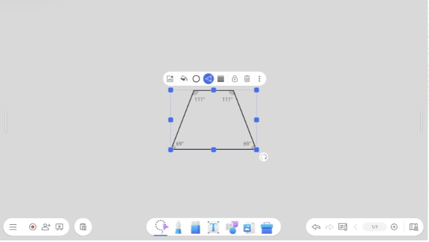
Google Slides search (WEB ONLY)
A new search tool is now available when adding Google Slides files to EZWrite 6.
Paste content from external applications
Users can now copy and paste text from external applications into EZWrite Web. When the copied content includes formatting or style information, such as text copied from Microsoft PowerPoint, it is pasted as an image to preserve its appearance.
[Enhancements]
-
AI Lesson content (Added to Windows this version)
Enhanced content generation for the four Lesson types in AI Lesson, providing more distinct and type-specific results. -
YouTube link thumbnails
YouTube link objects now display video thumbnails, making it easier for users to quickly identify the linked video content.
[Fixed Issues]
-
Fixed an issue where a brief display glitch occurred at the two-second mark when the timer was set to more than 10 seconds.
-
(CP05) Fixed an issue where EZWrite 6 crashed when the Page Up or Page Down button on the active pen was pressed while drawing.
-
Fixed an issue where the Floating Tool could not be dragged while remotely controlling the BenQ Board using remote desktop software.
-
Fixed an issue where images captured with the Floating Tool could appear stretched or distorted.
-
Fixed an issue where the Floating Tool did not appear correctly after user login or crashed under certain circumstances.
[Update Instructions]
Windows
This update requires manual installation. There are three ways to do this:
- Through the BenQ website.
- Through the Microsoft Store unless users have enabled automatic app updates in the Microsoft Store settings.
- Through the EZWrite 6 Windows app. To do this:
- Open the EZWrite 6 app.
- Tap
 .
. - Tap
 → Check for updates. The update details window appears.
 - Click Yes.