![logo-white.png]](https://knowledge.benq.com/hs-fs/hubfs/logo-white.png?width=50&height=50&name=logo-white.png)
[Issue]
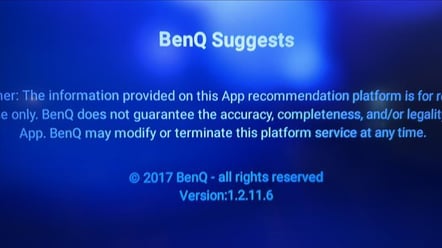
When opening up BenQ Suggests on my BenQ Board, nothing loads and I get the message below.
[Solution]
You will need to manually update the app by deploying the APK to the board. This can be done through DMS.
- Download the BenQ Suggests APK for your specific model below. If your model isn't listed below, then please reach out to your BenQ representative who will assist you in obtaining the proper APK file.
- RP01K / ST01K - Download HERE.
- Go to the ‘My Apps’ section of the Apps Section of DMS.

- Upload it to your application repertoire by selecting
 under 'My Apps'.
In the file explorer window, select the .apk file that you wish to upload and click 'OK'. You will be prompted to add a description, do so if you wish. You can now select continue and the upload will begin. Once completed, the application will show up under the 'My Apps' list of apps.
BenQ provides two gigabytes of storage on our servers to have all your apps ready to deploy when you receive a new board. You can see the amount of space currently used by your applications in the upper right-hand corner.

- Click the ‘Install’ button for the application you wish to deploy, and the device selection window will appear.

- Select a board or group of boards to which you would like to deploy the selected application and click 'Next'.

Your board does not have to be powered on when the application is installed. The installation prompt will stay cached on the server until your board goes online. The installation will proceed in the background and will not disturb the end-user's workflow.
You can see the apps that are awaiting deployment on a board that has not been powered on from the ‘Event Log’ tab from the main Dashboard view.
