![logo-white.png]](https://knowledge.benq.com/hs-fs/hubfs/logo-white.png?width=50&height=50&name=logo-white.png)
[Instructions]
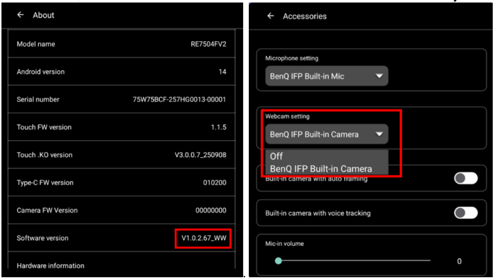
- Check Firmware Version. Confirm that the FW version is .67 or higher. By default, the IFP Built-in Camera should be visible under the Accessories.
- Modify Settings. Access the Admin Menu, navigate to Android Settings, and
toggle the "Disable built-in camera" option to ON (the default setting is OFF).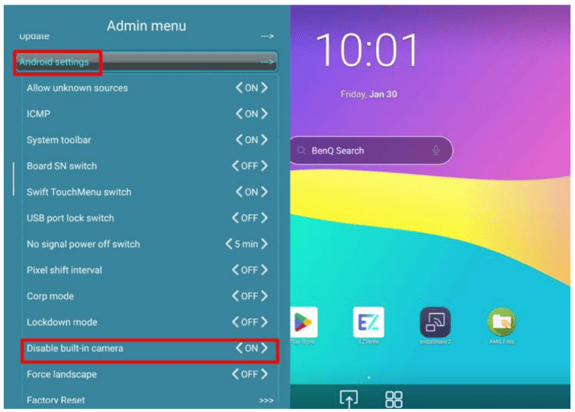
- System Reboot. Upon modification, a prompt will appear notifying you that the
IFP will automatically restart.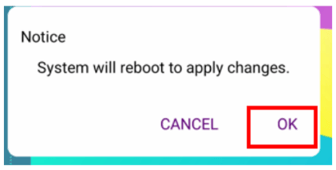
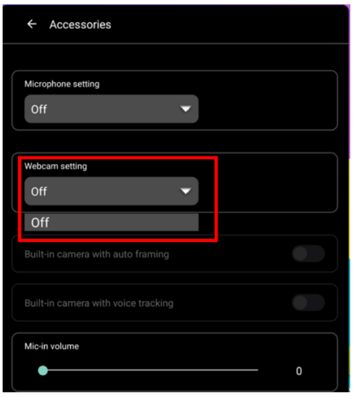
- Verification. After the reboot, verify that the IFP built-in camera is no longer
detectable or listed under Accessories.