![logo-white.png]](https://knowledge.benq.com/hs-fs/hubfs/logo-white.png?width=50&height=50&name=logo-white.png)
[Instructions]
- Ensure your BenQ Board is updated to the latest Firmware. To update your BenQ Board to the latest Firmware, click HERE.
- Deploy RISE Vision from the Application section of DMS to your Board.
- Navigate to Applications and locate our version of RISE Vision under BenQ Apps. NOTE: CANNOT use the RISE Vision Player from the Google Play Store.
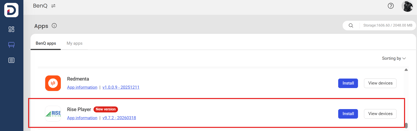
- Click Install and deploy this application to your BenQ Board. Confirm that the application is installed on your BenQ Board.
- Navigate to Applications and locate our version of RISE Vision under BenQ Apps. NOTE: CANNOT use the RISE Vision Player from the Google Play Store.
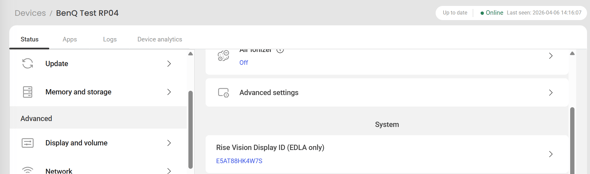
- Navigate to the Device section and go to the Detailed Information for your BenQ Board.
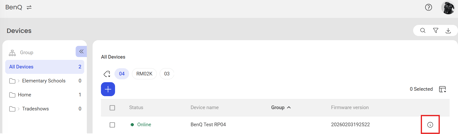
- Navigate to Status > Advanced > Device & system > RISE Vision Display. Copy the Display ID from RISE > Devices > Device into this field.
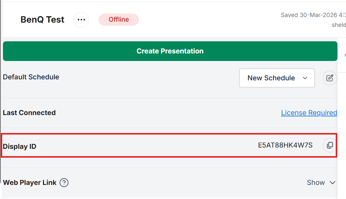
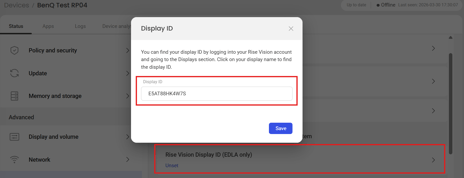
- Your BenQ Board should now be tied to RISE Vision by the Display ID instead of the user login.
[Update Instructions for DMS]
This update requires manual installation through DMS or on the BenQ Board.
Updating the firmware from DMS
⚠️ Warning
The firmware update restarts the devices automatically. Make sure to update the firmware during off hours.
- Go to https://dms.benq.com.
- Log in with your admin credentials.
- From the main menu, click Firmware. The list of available device models appears.
- Locate your BenQ Board model, and then click Update. The update summary appears.
- Review the update details, and then click Update.
Tip: You can also click Schedule to schedule the update at a later time.
Updating the firmware from the BenQ Board
⚠️ Warning
-
- The firmware update requires a system restart. Make sure to save all important data before proceeding.
- The update process may take a few minutes to complete. Ensure that there are no interruptions. Do not power off the device or disconnect from the internet to prevent permanent damage to the display.
- Open the Settings menu.
- Tap Advanced → System update.
- Tap Update system.
The system downloads and updates the firmware and then restarts automatically.